
TikTok Emojis: Complete Guide to Codes, Copy-Paste, PNGs and Meanings
You typed something in a TikTok comment and it looked boring. Someone else typed a bracket code and a wild little face popped up. That is the moment most people realize TikTok emojis work differently from everything else.
This guide gives you every code, every meaning, and every trick. Whether you need a TikTok emoji list, a copy-paste shortcut, or a transparent PNG download, it is all here. You will be done searching after this page.

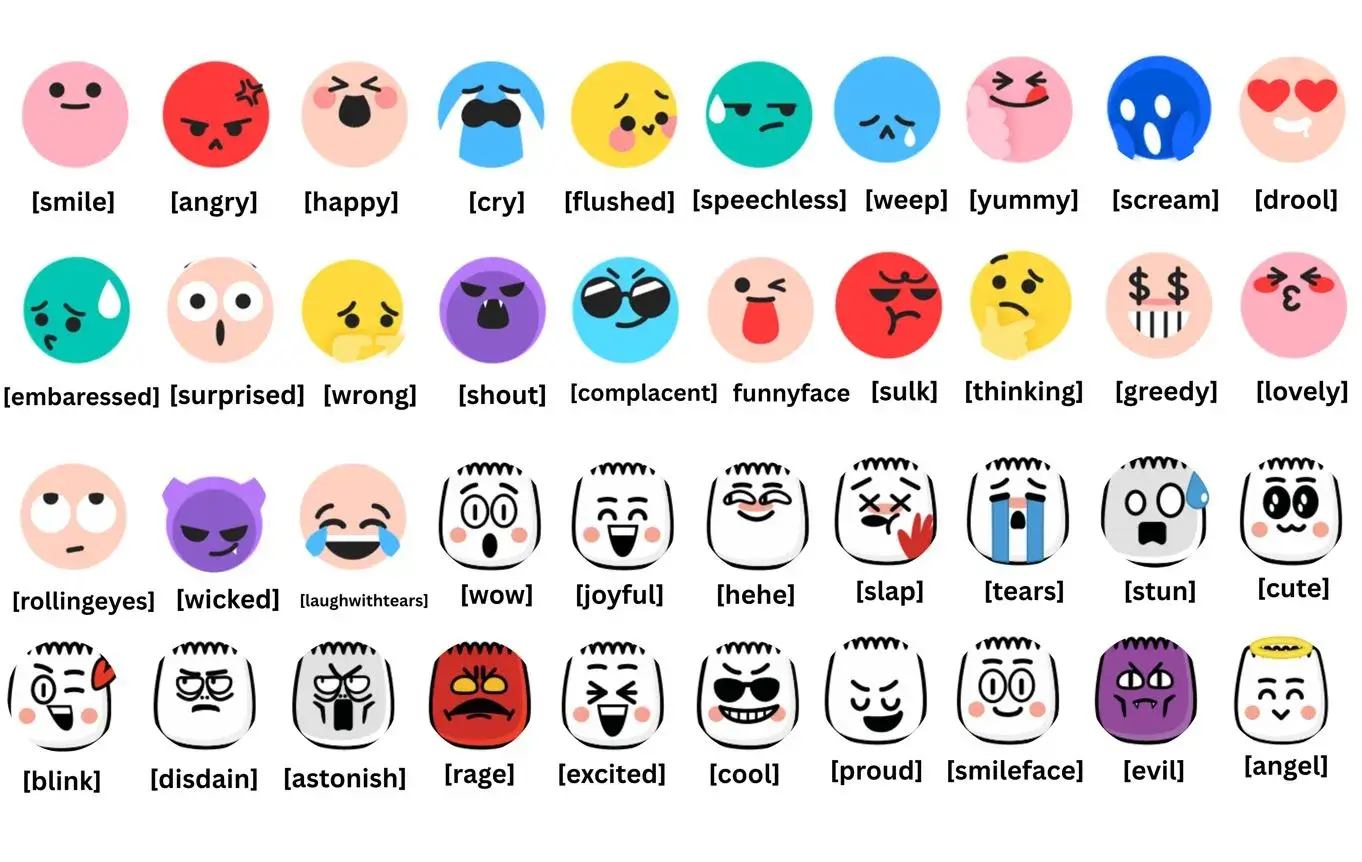
All TikTok Emojis 2026
Type or copy and paste the codes below to display the graphics visuals.

















































What Are TikTok Emojis
TikTok emojis are a set of custom emoji icons built directly into the TikTok platform. They are not the standard Unicode emojis you find on your phone keyboard. TikTok designed its own characters with a unique round-face style and a dumpling-shaped set that you cannot find anywhere else on social media.
When you type a bracket code like [smile] or [cry] inside a TikTok comment or caption, the app converts it into a custom illustrated face. That conversion happens instantly. The result looks nothing like a regular emoji from your iPhone or Android keyboard.
These custom icons give TikTok a distinct visual language. Regular emoji symbols feel familiar across every app. TikTok emoticons feel native, specific, and tied to the culture of the platform. That difference matters when you want your comment or caption to feel like it belongs there.
How TikTok Emojis Differ from Standard Emojis
Standard emojis follow the Unicode standard. Every platform renders them slightly differently, but they come from the same character set. Apple, Google, and Samsung each style them differently, but the base is identical.
TikTok exclusive emojis do not come from Unicode. You cannot type them from a regular emoji keyboard. You access them through bracket text codes typed manually. That is what makes the TikTok emoji vs iPhone emoji comparison so striking. One comes from a system keyboard. The other comes from knowing the code.
TikTok emotes also carry a slightly exaggerated, cartoon-like energy. The expressions feel bigger and more dramatic than standard emoji symbols. That visual intensity is exactly what drives engagement in comments and captions.
Why People Call Them Hidden or Secret TikTok Emojis
There is no official TikTok emoji keyboard you can browse. The platform never published a pop-up menu showing all the options. You have to know the codes to use them. That is what gave them the label of secret or hidden TikTok emojis.
Most new users scroll past hundreds of comments without knowing they could add those custom faces too. The moment someone shares a TikTok secret emoji list, it feels like a discovery. That sense of insider knowledge is part of what makes them appealing on the platform.
Why TikTok Uses Code-Based Emojis
There are two solid reasons TikTok built a code-based system instead of adding a visual picker.
First, it gives TikTok unique branding and expression. Custom illustrated faces tied to bracket codes are a signature feature. No other major platform does this exactly the same way. It creates a visual identity that stays consistent.
Second, it gives TikTok platform consistency. The same custom emoji looks identical in every comment and caption across every device. Whether someone uses a budget Android phone or a new iPhone, the rendered face looks the same. That level of control is only possible when the platform owns the image rather than relying on the device keyboard.
Types of TikTok Emojis
Not all TikTok emoji types work the same way. Three distinct categories exist on the platform, and each serves a different purpose.
Standard TikTok Emojis
Standard TikTok emojis are the regular Unicode characters you access through your phone keyboard. You can use them freely in comments, captions, and the bio section. They show up as the usual emoji reactions you see on every other social media platform. They work reliably and require no codes.
Secret and Hidden TikTok Emojis
This is where things get interesting. The TikTok secret emoji codes list contains 46 custom faces. You type a specific word inside square brackets, and TikTok replaces it with a custom illustrated character. These are the TikTok hidden emojis that most casual users never discover.
The full secret TikTok emoji codes list includes two visual styles. The round-face set covers most of the emotion-based expressions. The dumpling-shaped TikTok emojis form a second group with their own distinct look. Together they make up the complete hidden emoji collection.
TikTok Custom Emojis
Custom TikTok emojis go beyond the built-in set. Creators can upload original sticker-style images for use inside their own comment sections. These TikTok emoji stickers are specific to individual creators and their communities. They are not part of the standard TikTok emoji pack, but they add another layer of personal expression to the platform.
How to Use TikTok Emojis
Getting started with TikTok emoji codes is simple once you know the steps. The process works on both Android and iPhone without any special settings.
How to Add Emojis in TikTok Captions
Open TikTok and start creating or editing a video. When you reach the caption screen, type your caption text normally. To add a hidden emoji, type the bracket code in lowercase, such as [happy] or [proud]. After you post, TikTok converts the code into the custom face. You can combine TikTok emojis for captions with regular text and Unicode characters in the same line.
How to Add Emojis in TikTok Comments
Open any video and tap the comment field. Type your message and insert a bracket code anywhere in the text. Hit post. TikTok renders the custom face in place of the code. This works for TikTok emojis for comments across all videos, not just your own. Using these in comment sections makes your replies stand out from the rest of the thread.
How to Use Secret Emoji Codes
The TikTok emoji shortcode system follows one rule: always use lowercase text inside square brackets. Typing [Smile] or [SMILE] will not work. The code must be [smile] exactly. The same applies to every entry on the TikTok emoji shortcode list. Case sensitivity is the most common reason TikTok emoji codes stop working.
How to Copy and Paste TikTok Emojis
If you find a comment with a custom TikTok emoji, you can tap and hold to copy it. Pasting it into your own comment will carry over the rendered image. However, pasting TikTok emojis outside the app will not show the custom face. The images are platform-specific and will not display on Discord, WhatsApp, or Instagram. What you will see instead is the raw bracket text code.
How to Insert Transparent PNG Emojis in Videos
TikTok emoji PNG files with transparent backgrounds are useful for video editing. You can overlay them directly onto footage using any editing app. Download a transparent TikTok emoji PNG from a reliable source, import it into your editor, and place it over your clip. The HD TikTok emoji PNG format preserves crisp edges at any size, which matters when you scale the image up for full-screen moments in a video.
Full List of TikTok Secret Emoji Codes and Meanings
Here is the complete TikTok emoji codes list with meanings. Every code works in both captions and comments as of 2026. Type each code exactly as shown, in lowercase, inside square brackets.
Smile and Happy TikTok Emojis
[smile] – Smile TikTok emoji
A simple, classic smiling face. Great for light reactions and friendly replies.
[happy] – Happy TikTok emoji
Wide grin with big eyes. The TikTok happy emoji is one of the most used codes in comment sections.
[joyful] – Joyful TikTok emoji
A face bursting with happiness. Perfect for viral reaction moments.
[hehe] – Hehe TikTok emoji
A slightly mischievous smile. Works well for light teasing in replies.
[laugh] – Laugh TikTok emoji
Open-mouth laughter. The TikTok laugh emoji fits any moment that genuinely lands.
[laughwithtears] – Laughwithtears TikTok emoji
Laughing so hard tears fall. The laughwithtears TikTok emoji matches the energy of extremely funny content.
[funnyface] – Funnyface TikTok emoji
A goofy, exaggerated expression. Use it for comedic videos and absurd situations.
[smileface] – Smileface TikTok emoji
A warm, content expression. Slightly softer than the standard smile code.
Angry and Rage TikTok Emojis
[angry] – Angry TikTok emoji
Furrowed brows and a sharp expression. The TikTok angry emoji works for frustration reactions.
[rage] – Rage TikTok emoji
Intense anger with a red, steaming face. Use rage TikTok emoji for over-the-top dramatic reactions.
[shout] – Shout TikTok emoji
An open-mouth yelling expression. Works for both excitement and frustration depending on context.
[scream] – Scream TikTok emoji
Wide-eyed with an open mouth. The scream TikTok emoji covers moments of intense reaction.
Crying and Sad TikTok Emojis
[cry] – Cry TikTok emoji
Streaming tears with a sad expression. One of the most versatile codes in the TikTok emoji list.
[weep] – Weep TikTok emoji
A deeper sadness than cry. Use the weep TikTok emoji for genuinely emotional content.
[tears] – Tears TikTok emoji
A face with single tear streaks. Works for bittersweet or sentimental moments.
[wronged] – Wronged TikTok emoji
A pouting, hurt expression. Perfect for playful complaints in comments.
[speechless] – Speechless TikTok emoji
Blank-faced and silent. Use it when a video genuinely leaves you without words.
[disdain] – Disdain TikTok emoji
Unimpressed and slightly disgusted. Great for reactions to bad takes or cringeworthy content.
Shocked and Surprised TikTok Emojis
[surprised] – Surprised TikTok emoji
Raised eyebrows and a wide mouth. One of the most common TikTok emoji reactions.
[shock] – Shock TikTok emoji
An extreme version of surprised. The TikTok shocked emoji works for truly unexpected content.
[stun] – Stun TikTok emoji
Frozen with wide eyes. Stun TikTok emoji captures a moment of disbelief.
[astonish] – Astonish TikTok emoji
Somewhere between impressed and shocked. Use astonish TikTok emoji for genuinely impressive videos.
[wow] – Wow TikTok emoji
Star-struck with wide eyes. The TikTok wow emoji signals appreciation and awe.
Cute and Loving TikTok Emojis
[cute] – Cute TikTok emoji
Soft, sweet, and round-faced. The cute TikTok emoji is a creator favorite for warm reactions.
[lovely] – Lovely TikTok emoji
Rosy cheeks with an affectionate expression. Works for appreciation and admiration comments.
[loveface] – Loveface TikTok emoji
Hearts instead of eyes. The TikTok [loveface] emoji is one of the most-used codes for positive reactions.
[angel] – Angel TikTok emoji
A sweet, innocent face with a halo. TikTok angel emoji works for humble or wholesome content.
[blink] – Blink TikTok emoji
One eye closed in a wink. Light and playful for casual comment interactions.
[nap] – Nap TikTok emoji
Eyes closed, content expression. Use the TikTok nap emoji for calm, relaxing content.
[pride] – Pride TikTok emoji
A cheerful, confident face. Works for celebratory reactions and achievements.
Funny and Expressive TikTok Emojis
[embarrassed] – Embarrassed TikTok emoji
Flushed cheeks and a nervous expression. The TikTok embarrassed emoji fits cringe-worthy comment moments.
[flushed] – Flushed TikTok emoji
Red-cheeked and wide-eyed. TikTok flushed emoji works for compliments, surprises, and awkward situations.
[drool] – Drool TikTok emoji
Mouth slightly open with a drool drop. The TikTok drool emoji is perfect for food videos and impressive visuals.
[greedy] – Greedy TikTok emoji
Rubbing hands with an eager expression. Use greedy TikTok emoji for deal reveals, money talk, and giveaways.
[slap] – Slap TikTok emoji
A slapstick, playful face. Works for comedic moments and over-the-top reaction content.
[awkward] – Awkward TikTok emoji
Nervous smile with avoidant eyes. The TikTok awkward emoji captures secondhand embarrassment perfectly.
[thinking] – Thinking TikTok emoji
A hand-on-chin contemplating face. The TikTok thinking emoji is great for opinion or debate content.
[yummy] – Yummy TikTok emoji
Tongue out with satisfied eyes. Works for food content and anything visually pleasing.
[complacent] – Complacent TikTok emoji
Relaxed and unbothered. Use it to signal calm confidence or a laid-back attitude.
Cool, Proud and Bold TikTok Emojis
[cool] – Cool TikTok emoji
Sunglasses and a smooth expression. The TikTok [cool] emoji is a creator favorite for flex moments.
[proud] – Proud TikTok emoji
Chin up with a pleased expression. The proud TikTok emoji works for milestone announcements and achievements.
[excited] – Excited TikTok emoji
Vibrating with anticipation. Great for countdowns, announcements, and hype-building content.
[evil] – Evil TikTok emoji
A cunning, plotting expression. The TikTok evil emoji fits strategic reveals and sneaky humor.
[wicked] – Wicked TikTok emoji
Similar to evil but with a sharper edge. The TikTok [wicked] emoji is popular in dark humor and edgy creator content.
[sulk] – Sulk TikTok emoji
Pouting and withdrawn. Use sulk TikTok emoji for playful complaints and moody commentary.
[facewithrollingeyes] – Facewithrollingeyes TikTok emoji
Eyes rolled far up. Works well in response to obvious or repetitive statements in comment threads.
Unique TikTok Emoji Meanings You Should Know
Some emoji meanings on TikTok are not tied to bracket codes. They come from how the community uses standard symbols in creative ways. The skull emoji became a way to say something is so funny it killed you. The chair emoji briefly spread as an inside joke replacing the laughing emoji. The sparkle emoji signals aesthetic content and cinematic energy. The clown emoji calls out someone for obvious behavior. Knowing these adds a layer of cultural fluency that most outsiders miss.
Most Popular TikTok Emojis in 2026
The most popular TikTok emojis shift with content trends. In 2026, certain codes dominate comment sections and appear in viral TikTok emoji combinations more than others.
Trending TikTok Emojis Right Now
The [cry], [loveface], [shocked], and [cool] codes appear most frequently across viral videos. Creators use them in caption patterns that perform consistently well on the For You page. Trending TikTok emojis often reflect whatever emotional tone a content cycle carries. During drama cycles, [rage] and [scream] spike. During aesthetic waves, [lovely] and [angel] dominate. Staying aware of TikTok emoji trends helps you match the emotional vocabulary of the moment.
Most Used TikTok Emojis in Comments
Comment sections tell a different story than captions. The most used TikTok emojis in replies are [cry], [laugh], [wow], and [smile]. These four cover the widest range of emotional reactions and carry enough tone to make a comment feel complete without needing extra words. Creators who understand TikTok emoji reactions know that a single well-placed code often outperforms a full written reply.
Creator-Favorite TikTok Emojis
High-volume creators tend to build signature emoji patterns into their captions. Using the same two or three codes consistently creates a recognizable brand voice. Viral TikTok emojis from creator accounts often spread because fans start using the same codes in comments. That cycle builds TikTok community identity around a visual language tied to a specific account.
TikTok Emoji PNG Files with Transparent Backgrounds
TikTok emoji PNG images serve a different purpose than comment codes. They are used in video production, graphic design, and overlay editing. The transparent background format means you can layer them over footage without any white box or visible edge.
How to Download Transparent TikTok Emojis
Search for HD TikTok emoji PNG files from emoji resource sites. Look for files labeled with transparent backgrounds rather than white fills. Download the TikTok emoji pack or individual files depending on your editing workflow. PNG format preserves quality when you scale up, which matters if you are dropping the image into a full-resolution video project. TikTok emoji images with transparent backgrounds are free to download from several platforms and compatible with most editing software.
Using PNG Emojis in Video Editing
Import the transparent TikTok emoji PNG into your editing timeline as an overlay track. Scale and position it to match your video composition. Using these images lets you replicate the TikTok emoji look inside content produced on desktop or in full editing suites, not just inside the TikTok app itself. This approach works well for reaction videos, explainer clips, and any content that benefits from expressive illustrated faces.
Why TikTok Emojis Improve Engagement
Using TikTok emojis is not just a style choice. It is a communication strategy that affects how people interact with your content.
Boost Visual Appeal and Watch Time
Captions with visual variety hold attention longer during the first two seconds of a scroll. When someone sees a custom illustrated face embedded in a caption, it reads as something designed rather than typed. That small distinction can keep someone watching instead of swiping. TikTok emojis for captions break up plain text and add a layer of personality that generic captions lack.
Stand Out on the For You Page
The For You page is crowded. Thousands of videos compete for the same eyeballs at the same moment. A caption that uses a familiar bracket emoji code signals to the viewer that the creator knows TikTok culture. That signal builds trust quickly. It tells someone this creator belongs here. That sense of belonging increases the chance they follow, comment, or share.
Increase Comments, Likes, and Shares
Comments with custom TikTok emojis tend to get more replies. They catch the eye while someone scrolls through a thread. Best TikTok emojis for engagement include [wow], [cry], and [loveface] because they trigger emotional recognition. When other viewers see those codes in a comment, they feel the emotion and respond. That emotional chain reaction drives more organic interaction than plain text alone.
Tap Into TikTok Trends and Culture
Emoji culture on TikTok shifts fast. The platform rewards content that feels current. Using trending TikTok emojis in the right context signals awareness. Creators who track which TikTok emoji combinations appear in high-performing comments can reverse-engineer what feels native in any given content cycle. That kind of cultural reading is a real TikTok marketing skill.
Build a Recognizable Brand Voice
Consistent emoji usage across captions and comments builds visual brand consistency. Audiences start to associate certain emoji patterns with specific creators. Over time, that pattern becomes part of the brand identity. TikTok content creation at a high level is not just about video quality. It is about building a complete communication style that spans every word and every icon you publish.
Creative Uses of TikTok Emojis in Content
Enhancing Storytelling in Captions
Captions that tell a short story perform better than static description lines. Inserting a [cry] or [shocked] code at a story beat punctuates the moment visually. It gives the viewer a cue about how to feel before the punchline or reveal lands. This technique mimics the natural way people use emoji reactions in casual messaging and brings that energy into TikTok captions ideas that actually convert viewers into commenters.
Expressing Emotion in Comment Sections
Digital expressions carry more weight when they are visual. Typing [loveface] communicates something faster than typing the word love. It cuts through text and registers as a feeling. Creators who respond to comments with custom TikTok codes look more engaged than those who reply with plain words. That perception of engagement matters for how the TikTok algorithm reads your account activity and rates your community interaction.
Best Practices for Emoji Placement in Videos
When using transparent TikTok emoji PNG files in video editing, placement matters. Put them in the upper third or lower third of the frame, not directly over a face or key subject. Use scale to match the energy of the moment. A large [rage] face during a comedic escalation reads as intentional. A tiny [angel] tucked in the corner reads as subtle and stylized. The right size and placement turns a static overlay into part of the visual story.
Platform and Device Compatibility
TikTok Emojis on iPhone
TikTok emojis on iPhone work exactly as expected. Open the comment field or caption box, type the bracket code in lowercase, and post. iOS does not interfere with the bracket input. The app renders the custom face regardless of which iOS version you are running. The TikTok emoji vs iPhone emoji distinction is purely visual. Both display fine on the same screen, side by side.
TikTok Emojis on Android
TikTok emojis on Android work identically to iOS. The same codes apply. Some Android keyboards auto-correct bracket text, which can break the code before you post. If that happens, disable auto-correct for the TikTok text field or type the code slowly to prevent the keyboard from reformatting it.
TikTok Emoji Codes on Desktop
TikTok emoji codes desktop support works through the TikTok web app. You can type bracket codes in comment fields on a browser the same way you do on mobile. The rendering behaves identically. Desktop creators who manage comments at scale can paste codes directly using a saved reference list, which speeds up response time significantly.
TikTok Emoji Codes Not Working — How to Fix
There are a few reasons TikTok emoji codes stop working. The most common is capitalization. The code must be fully lowercase inside the brackets. A second reason is extra spacing. No spaces should appear inside the brackets. A third reason is an outdated app version. Updating TikTok usually resolves rendering issues tied to a TikTok emoji update. If codes work on mobile but not desktop, try clearing the browser cache before trying again.
Can You Use TikTok Emojis Outside TikTok
The bracket codes only render inside the TikTok app. If you copy a custom TikTok emoji from a comment and paste it into a Discord message, WhatsApp chat, or Instagram caption, it will appear as plain bracket text like [smile] rather than the illustrated face. The images are platform-specific and tied to TikTok’s rendering engine.
To use TikTok-style images on other platforms, download the TikTok emoji PNG files and upload them as custom stickers or reactions where the platform allows it. Discord allows custom emoji uploads for servers. That workaround brings TikTok emotes into other community spaces while maintaining the visual style.
The Future of TikTok Emojis
TikTok has added new emojis in previous updates and will likely expand the set further. The current 46 codes have remained consistent through most of 2025 and into 2026, but the platform occasionally introduces limited regional or event-based codes. Creators in the UK, Australia, Canada, and India sometimes report access to region-specific codes that do not appear globally. Checking for a TikTok emoji update after major app releases is worth doing if you want to stay ahead of any new additions.
The shift toward emoji culture as a form of visual communication online is accelerating across every platform. TikTok was early in building a proprietary code-based system. As generative content and AI-assisted creation grow, custom expression tools like these will matter even more. They keep human-feeling micro-reactions alive inside algorithmically distributed content.
Final Thoughts
TikTok emojis are more than a cosmetic detail. They are a functional part of how the platform communicates. Knowing every code in the TikTok emoji list, understanding what each one signals, and using them with purpose gives your content a native fluency that casual users lack.
Whether you are here for the TikTok emoji copy paste shortcuts, the transparent PNG downloads, the full TikTok secret emoji codes list, or just trying to figure out why your codes were not working, this guide covered it all. The codes are yours now. Go use them.
All secret TikTok emojis codes (Cheat sheet)

Frequently Asked Questions
What are TikTok hidden emojis
They are 46 custom illustrated faces you unlock by typing specific bracket codes in TikTok comments or captions. They do not appear on any keyboard. You need to know the codes to access them.
How many TikTok secret emojis are there
There are 46 confirmed secret emoji codes in the current TikTok emoji list as of 2026.
Are TikTok emoji codes available on Android and iPhone
Yes. All 46 codes work on both platforms. The rendering is identical across devices.
How to download TikTok emoji PNG files
Search for TikTok emoji PNG download on emoji resource sites. Download the transparent background versions for video editing and overlay use.
Can I use TikTok emojis outside TikTok
The bracket codes only render inside TikTok. To use the images elsewhere, download PNG files and upload them as custom emoji on platforms that allow it.
Why are TikTok emoji codes not working
Check that your code is fully lowercase with no spaces inside the brackets. Update the TikTok app if the issue persists. On desktop, clear your browser cache.
Can TikTok emojis be used in bio
Standard Unicode emojis work in the TikTok bio. The secret bracket codes do not render there. Only captions and comments support the custom illustrated faces.
Do TikTok emojis improve engagement
Yes. Custom emoji expressions trigger faster emotional recognition than plain text. They increase comment interaction, caption readability, and overall profile engagement over time.
Are TikTok emojis free to use
All 46 secret codes are completely free. No payment, subscription, or in-app purchase is required.